
Blog Post

The Center of Gravity (CoG) functionality of the AIMMS SC Navigator application is upgraded. In this blog, Paul van Nierop, Product Owner, explains what Center of Gravity is, provides details on exciting new functionality, and shares best practices on how to best use the feature.
Center of Gravity Explained
Center of Gravity is a technique that is commonly used to support Greenfield analysis in SC Navigator. It is used as an ideation tool to generate candidate locations for new (greenfield) production or warehouse capacity. These candidate locations are then combined with current (brownfield) locations in the Network Model to decide on the best mix of Brownfields and Greenfields capacity in the redesigned network.
For a deeper understanding of Greenfield analysis and its impact on supply chain design, read our blog on The Role of Greenfield Analysis in Modern Supply Chain Design.
CoG is a powerful technique because it is simple and intuitive to use. It is, however, a high-level tool that uses some simplifying assumptions in the algorithm to come up with solutions. This is necessary because the solution space for candidate locations is technically infinite (it could be any dot on the map).
For this reason, CoG uses straight-line distances instead of actual road distances, uses average warehouse and transport costing instead of actual costing, and is unconstrained in terms of supplier, production, and warehouse capacities.
CoG functionality has long been a feature of SC Navigator and is used extensively by customers when re-designing their network to include Greenfield capacity.
1. Constrained CoG
CoG is a high-level tool, and should not be used on its own to provide final recommendations. At AIMMS, we always advise customers to use CoG for ideation only (generate the candidates). These candidates should always be evaluated in more detail in the full SC Navigator solve, where some of the assumptions used in CoG can be converted into real data.
For example, actual road distances can be used, actual warehouse and transport costing can be included, capacity constraints for suppliers, and production facilities and warehouses can be included.
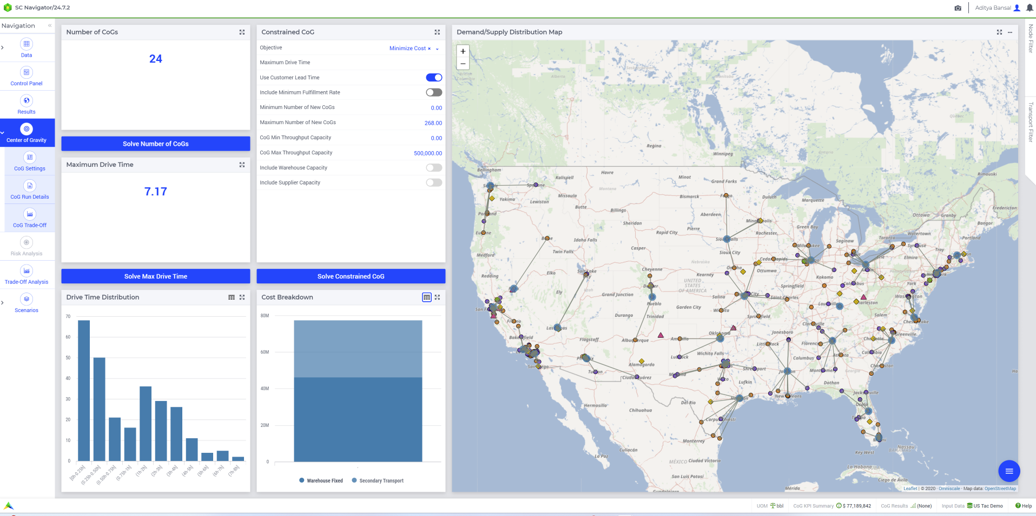
There is now, however, a middle ground between Unconstrained CoG and the full SC Navigator solve. Since both sets of functionalities reside in the same application, and the data required for CoG is a subset of the data required for SC Navigator and is already in the underlying dataset, it made sense to introduce the concept of Constrained CoG.
Constrained CoG retains the power of finding new locations on an unlimited blank canvas, but allows the user to include known constraints in the CoG solve. The recommended candidate locations now take into account the following constraints :
- New warehouse capacities
- Existing warehouse capacities
- Existing supplier capacities
- Demand fulfillment constraints (e.g., fulfill at least 95% of all demand)
- Lead time constraints (max drive time allowed to reach a customer)
The advantage of running a constrained CoG is that the candidate locations are more realistic than for an unconstrained CoG because they take into account real-life constraints that are already known.
We see great advantages in using constrained CoG when applicable, but still advise our clients to take the final step and combine the candidates in a full SC Navigator solve. The reason for this is that the constrained CoG takes into account constraints, but still uses straight-line distances and average costing.
We see a role for Unconstrained CoG, Constrained CoG, and Full SC Navigator solves, and all of these functionalities are now available in SC Navigator.
2. CoG Trade-Off Analysis
CoG is a simple and powerful tool and gives great insights when doing Greenfield analysis. Because it gives users a blank canvas to experiment on, the workflow typically involves running many CoG scenarios and comparing them with each other before deciding on a set of CoG candidates to include in the full SC Navigator solve.
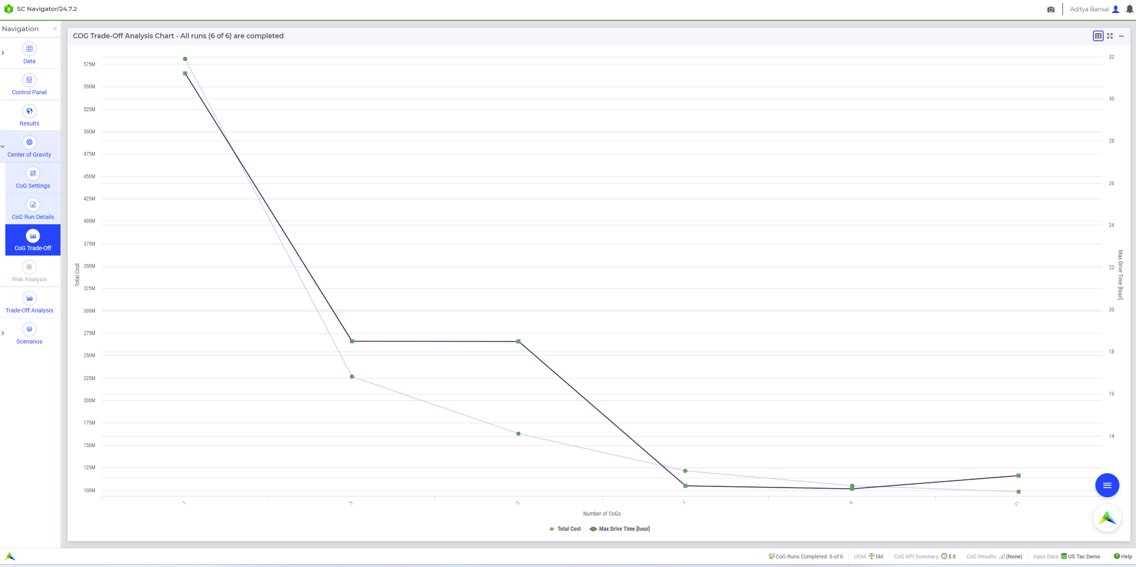
To make this process easier for users, we have added CoG Trade-Off Analysis functionality to the SC Navigator application. With this new functionality, the user can select a range of scenarios and run these in a batch. For example, run 6 scenarios for 5/6/7/8/9/10 CoG’s. Or run 5 scenarios where lead time constraints range from 1,2,3,4,5 hours.
The user configures the required scenarios and runs them in a batch, and the results of all scenarios are combined, either in an Excel file for export, or in the Trade-Off Analysis graph in the application, or in a map with filters (see diagram below).
The functionality is called CoG Trade-Off Analysis because it allows the user to create charts in the app that show the trade-off between the input (number of CoGs, drive time constraint) and the results (e.g., cost, km driven, weighted average drive time).
Previously, this typical workflow was performed manually and involved work outside of the app to get the desired result. With the automation that we have built into this feature, we hope to make CoG even easier to use and more impactful for users.
For more details, check out the documentation for the new CoG trade-off analysis.
Now Available for SC Navigator Users
CoG and all the new functionalities are live and available for SC Navigator users. We hope you enjoy using it, and feedback on improvements is always welcome.
Want to see how Center of Gravity functionality works in AIMMS SC Navigator?