

Blog Post
You are in a meeting with your stakeholders, and you’ve been asked to quickly explore a few supply chain scenarios on the spot.
You know exactly what needs to happen: close a warehouse, shift demand, test a variation. But you also know how many steps, input fields, and configurations stand between you and the answer. And you don’t have time.
Now imagine you typing: “Run a scenario where warehouse X is closed, and demand grows by 3%.” And instead of configuring everything manually, it’s already running.
That’s what SENSAI Pro brings to SC Navigator.
Your words become actions
You may already use SENSAI to find answers, navigate faster, or look up documentation. If you are unfamiliar with SENSAI, it is an AI companion inside SC Navigator, which explains how to do something.
And now SENSAI Pro does it for you.
That’s the difference. You describe what you want in your natural language. SENSAI Pro understands your intent, connects it to your data and your model, and executes it using the same deterministic mathematical engine SC Navigator has always relied on.
Every answer still comes from the rigorous optimization you trust. SENSAI Pro just removes the manual steps between your question and the result.
Less setup, more insight
A lot of Network Design work isn’t complex. It’s repetitive.
SENSAI Pro helps you move through the whole Network Design workflow, all of it faster. You can:
- Change and adjust data
- Create and run scenarios
- Compare results across key KPIs — including custom calculations
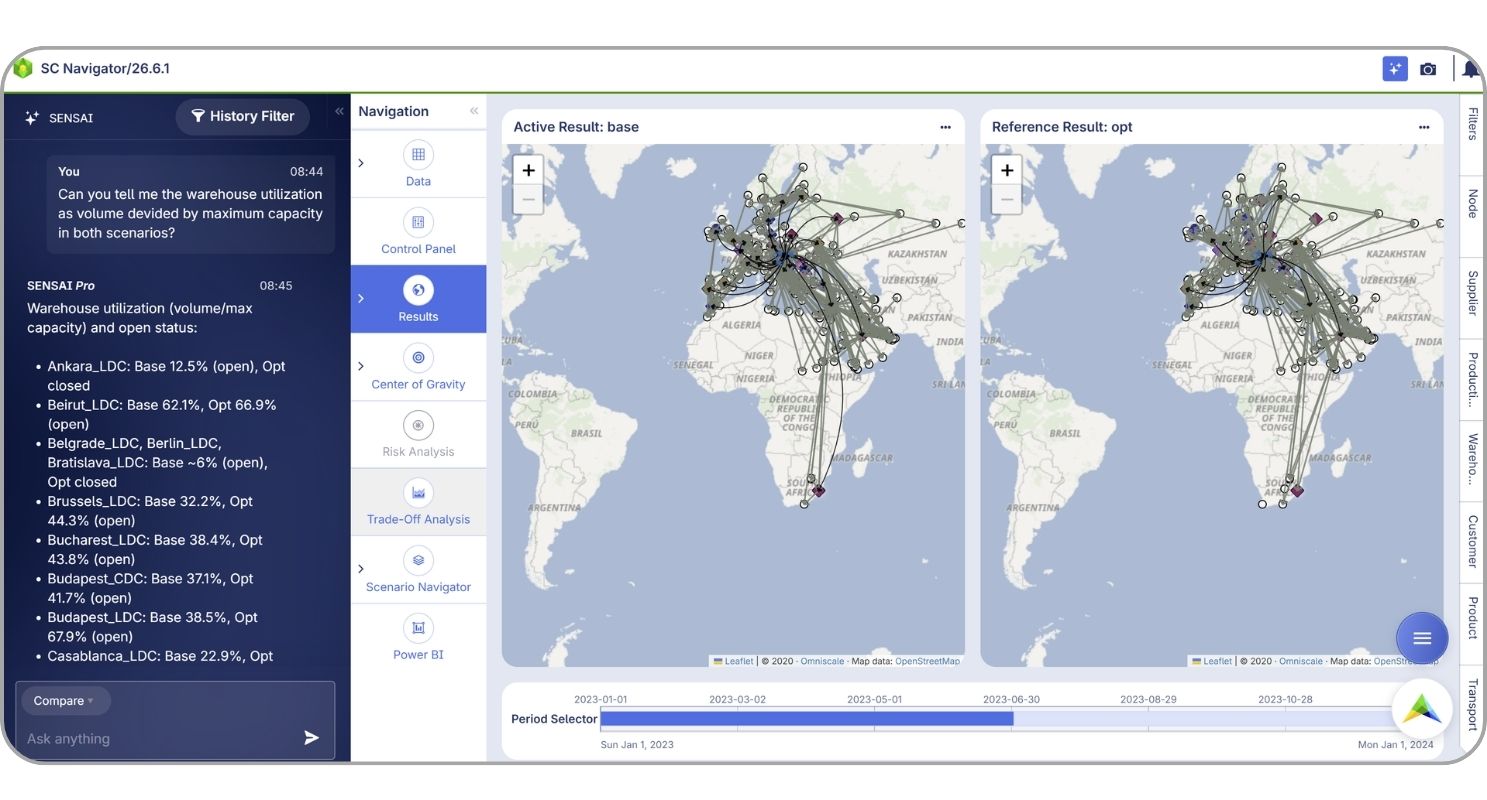
Whether your team works in English, Japanese, Portuguese, or any other language, SENSAI Pro understands you.
For planning teams who want to run network design but don’t have years of SC Navigator experience, this dramatically lowers the barrier to entry. You explain what you need. SENSAI Pro handles the rest.
AI you can trust
Network designers are accountable for major decisions. You advise boards, guide strategy, and need to be able to stand behind your results. So SENSAI Pro was built to ensure accurate and consistent results, and with two features you won’t find in most AI tools: full clarity of changes and an undo button.
Every action SENSAI Pro takes is visible. It shows you exactly what it changed, so you can verify it was correct, or undo it if not. This isn’t a minor feature. It’s the foundation of responsible AI for supply chain work, where trusting your outputs is non-negotiable.
SENSAI Pro also knows its limits. If a request falls outside of what it can reliably do, it tells you, rather than guessing. That kind of honesty is what makes the things it can do trustworthy.
Scenario comparison, finally solved
One of the most custom parts of Network Design is comparing scenarios. Most teams end up exporting data to Power BI or Excel to run custom KPI comparisons and own calculations.
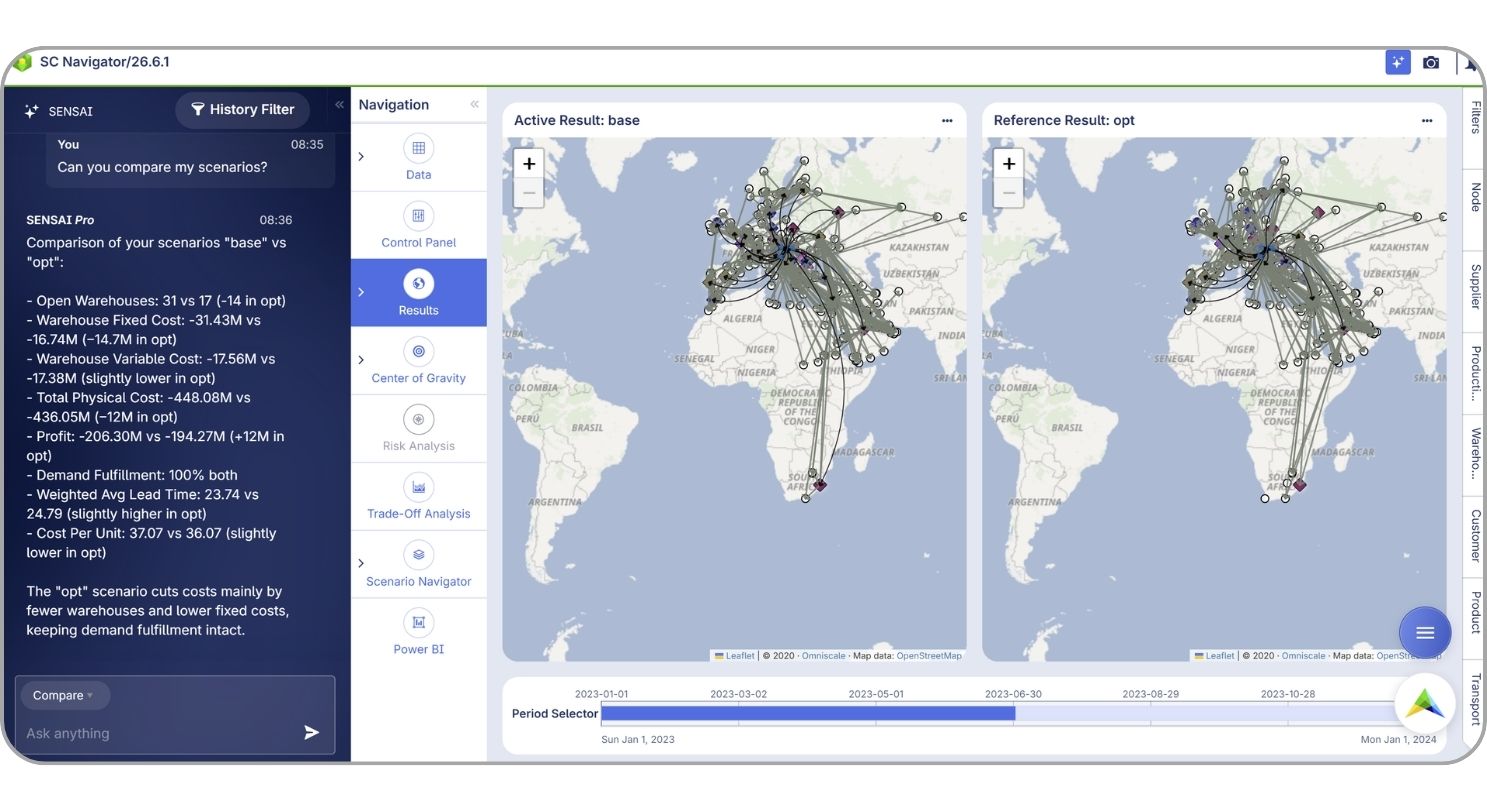
SENSAI Pro changes this. You can ask it to compare scenarios on any objective that matters to your business, including custom calculations, not just the KPIs predefined in SC Navigator. Ask it things like:
- “Compare the total cost across these scenarios.”
- “Which warehouses serve the most customers in each option?”
- “Show me the top five biggest cost differences by location.”
SENSAI Pro generates the comparison for you, helps you to interpret it, and you can copy it directly to Excel for further analysis if you’d like. It was the most-requested feature from our early access users, and it’s here.
“I prompted SENSAI Pro to update our inventory variable costs to different numbers and have it run scenarios with each of those costs. It saved time by doing everything at once compared to updating/running everything manually. I can see SENSAI Pro being useful in running scenario comparisons across all our projects.”
What’s next
This first release of SENSAI Pro focuses on helping you work faster: less manual effort, more time on the decisions that matter.
What’s coming next is about helping you work smarter.
SENSAI Pro will become a proactive assistant, suggesting what to explore after you upload data, guiding you through infeasibility issues, and opening up possibilities you might not have thought to test.
We will also expand the SENSAI family, supporting your entire Network Design journey, from turning raw data into optimized networks to delivering stakeholder-ready presentations.
Get started with SENSAI Pro
SENSAI Pro is now available for all SC Navigator users. To get started, you’ll receive a guided onboarding session from our pre-sales team, a short, focused demo that shows you what SENSAI Pro can do and how to get the most out of it from day one.
New to SENSAI? Explore how our AI companion helps companies make faster, smarter decisions.
See how SENSAI Pro helps you move from questions to scenarios faster with less manual effort.